Omniscrape: Extract Metadata from Any HTML
Omniscrape is a TypeScript library that reads author and page metadata from HTML: meta tags, JSON-LD, and Next.js or Nuxt hydration data. One call, one result.
By Shaykh Farhan

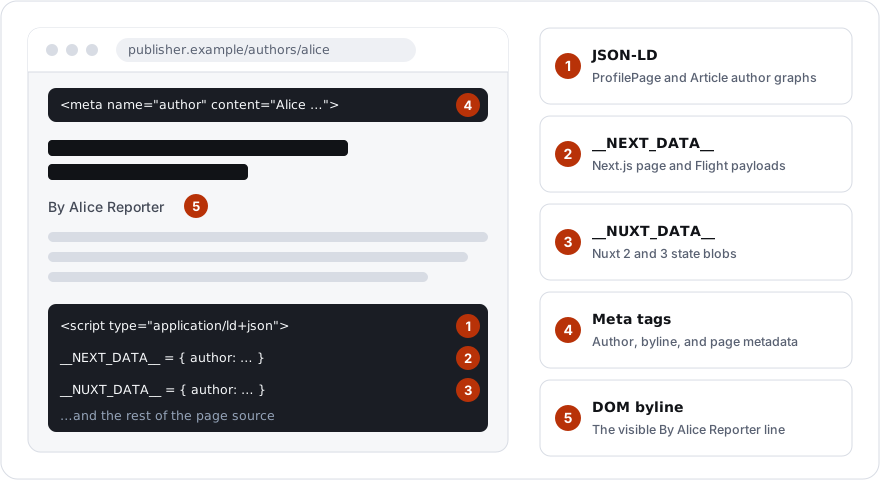
Publisher pages do not store an author in one place. One page puts the author in JSON-LD. The next hides the same person in a Next.js hydration payload. Another keeps them in a Nuxt state blob, a meta tag, or a byline in the DOM. If you build scrapers for a living, you know the pattern: you write an extractor for one site, the next site breaks it, and the one parser you meant to write becomes five parsers with five bugs.
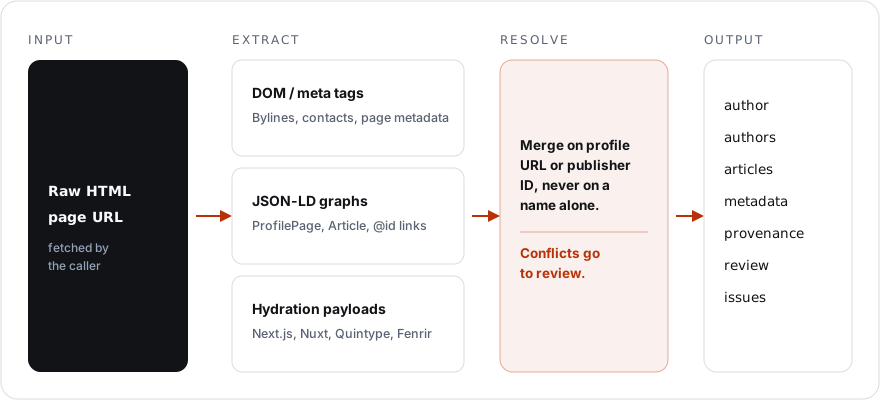
I built Omniscrape to end that. It is a TypeScript library that takes raw HTML and a page URL and returns the author, the page metadata, and the evidence behind every field. One call, one result, no browser.
One call
npm install @sfsajid91/omniscrapeimport { parseHtml } from "@sfsajid91/omniscrape";
const result = parseHtml({ html, pageUrl: url });
result.author.name; // "Alice Reporter"
result.author.email; // "writer@example.org"
result.authors; // resolved author or confirmed co-authors
result.articles; // discovered articles
result.metadata; // page title, description, canonical URL
result.provenance; // evidence behind accepted fields
result.review; // unresolved identities and conflicting values
result.issues; // malformed or unsupported sourcesThat is the whole API surface for most uses: one synchronous function. It does not fetch the page. You fetch it with your own client and pass the final URL, so redirects, retries, and rate limits stay your decision:
const response = await fetch("https://publisher.example/authors/alice");
if (!response.ok) throw new Error(`HTTP ${response.status}`);
const result = parseHtml({ html: await response.text(), pageUrl: response.url });
What it reads
Every extractor runs over the same HTML, and the results are linked into one answer instead of five separate guesses.
| Source | Support |
|---|---|
| Next.js | __NEXT_DATA__ and recognized inline App Router Flight records |
| Nuxt | Nuxt 3 __NUXT_DATA__ and restricted static Nuxt 2 window.__NUXT__ payloads |
| Quintype / Bold | Recognized static page, story, author, and editorial payloads |
| Fenrir | fenrir-client-data and static fenrirClientData declarations |
| Generic state | Static __INITIAL_STATE__ / __PRELOADED_STATE__ assignments |
| JSON-LD | ProfilePage, Article authors, cross-script @id references, article lists |
| DOM / meta | Scoped author/byline details, contacts, page metadata, article headline links |
Hydration payloads can contain author records that are richer than the visible DOM. Omniscrape reads recognized payloads alongside JSON-LD, meta tags, and page content, then resolves the evidence together.
Names lie, profile URLs do not
The hard part of author extraction is not finding a name. It is knowing which name belongs to which person. Two authors can share a name. One author can appear under two spellings. A page can carry the article author, the section editor, and a generic site byline at the same time, and a naive extractor will happily merge all three into one person.
Omniscrape merges author profiles only on an explicit profile URL or a publisher-namespaced ID, never on a matching name alone. Equal slugs cannot override distinct profile URLs or CMS IDs. Article authors stay strictly separate from editorial owners, related story authors, session users, and generic site bylines.
When two sources disagree, it does not guess. If two sources give different email addresses for the same author, both addresses stay in author.emails, author.email is withheld, and the conflict is recorded in review with the evidence for each side:
// Two sources disagree on the author's email.
// Omniscrape keeps both and withholds the single value:
result.author.email;  // withheld: the sources disagree
result.author.emails; // ["alice@publisher.example", "alice@personal.example"]
result.review;        // the conflict, with evidence for both addresses
That is a deliberate design choice. A wrong email in an enrichment pipeline costs more than a missing one. The review bucket exists so a human, or a later pipeline step, can decide with the evidence attached instead of trusting a guess.
Accepted fields carry provenance, including the source URL, DOM or JSON path, scope, and confidence value. If a result looks wrong, that evidence helps trace it back to its source.
Why it never opens a browser
Omniscrape is pure static analysis. No network requests, no browser sandbox, no page script execution. It runs as in-memory compute on the string you hand it and returns a structured object. No side effects, no disk, no I/O.
There is no browser to launch or keep alive, and the work has configurable limits. By default, HTML over 8 MiB is refused, a script over 2 MiB is skipped and recorded, and decoding is bounded by 50,000 nodes and a depth of 128. A broken script records an issue and parsing continues with the remaining sources. Invalid URLs throw TypeError; oversized HTML throws RangeError. Callers remain responsible for network timeouts and transfer limits.
Omniscrape vs Metascraper
Metascraper is the standard general-purpose metadata extractor, and it is good at what it does: titles, descriptions, and Open Graph data across JSON-LD, microdata, meta tags, and DOM bylines. If you need a title and a description, it is the simpler tool.
Omniscrape is narrower and deeper. It targets decoding framework hydration payloads, linking disparate sources into one identity, and determining person-level attribution with explicit conflict handling and provenance trails. If you need to know who wrote the article, and be able to prove it, that is what Omniscrape is for.
Where it fits
Anywhere a pipeline turns publisher pages into structured data: author directories, newsroom enrichment, lead lists built from bylines, and content catalogs that need reliable attribution. It is the author-extraction step in my own scraping work, and it is the reason I stopped writing one-off extractors per site.
Omniscrape is open source under MIT. The package is @sfsajid91/omniscrape on npm, the source is on GitHub, and the case study has the full story of why it exists. Tests run with bun test.